Yubikey Bio
: Resources & Documentation

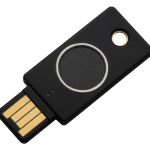
The Yubikey Bio
The YubiKey Bio combines Yubico’s industry-leading hardware security with a seamless user experience through biometric fingerprint authentication. Specifically designed for desktop environments, it offers secure,passwordless login and robust two-factor authentication. The fingerprint template is securely stored directly within the key’s hardware, ensuring that your biometric data never leaves the device.
Technical Specifications of the Yubikey Bio
Interfaces & Connectivity
The YubiKey Bio uses a USB-A interface (USB 2.0). It is optimized for use on desktop computers.
Physical specifications
Form factor: "Ticket"-style flash drive, rugged and compact.
Connector: USB-A.
Dimensions: 18 mm x 45 mm x 3.75 mm.
Weight: 5 g.
Environmental durability: Highly impact-resistant, waterproof, and dustproof design (IP68 rating). No battery or moving parts.
Temperature ranges:
Operating temperature range: 0 °C to 40 °C
Storage temperature range: -20 °C to 85 °C
FIDO2 / WebAuthn Protocol
Capability: Enables ultra-fast 2FA or passwordless authentication.
Storage capacity: Up to 100 resident keys (Passkeys).
Biometric Security: Fingerprint authentication with a PIN as a fallback.
Authentication process: The user inserts the key and places a finger on the sensor to verify their presence and identity. Device certified by the FIDO Alliance.
FIDO U2F Protocol
The U2F app is certified by the FIDO Alliance. It allows you to generate and store an unlimited number of credentials to secure your accounts using two-factor authentication (2FA).
Guide et accompagnement sur la technologie biométrique YubiKey Bio
La YubiKey Bio Series combine la cryptographie asymétrique sur support matériel inviolable et la simplicité d'utilisation de l'authentification biométrique par empreinte digitale. Répondant aux spécifications édictées par l'Alliance FIDO et alignée sur les préconisations d'hygiène informatique de l'ANSSI, elle supprime les vulnérabilités liées aux mots de passe tout en sécurisant l'accès aux environnements professionnels.
Fonctionnement de la sécurité biométrique intégrée
À la différence des dispositifs logiciels analysant les empreintes via le système hôte, la YubiKey Bio intègre un élément sécurisé dédié (Secure Element). Le modèle biométrique y est stocké et chiffré directement : aucune donnée ne transite sur le réseau, n'est envoyée sur un serveur tiers ou exportée hors de la clé physique.
- Connexion sans mot de passe (Passwordless) : Déverrouillez vos postes, sessions Cloud, Google Workspace et Microsoft Entra ID d'un simple effleurement du doigt.
- Secours par code PIN : Un code PIN configuré lors du premier appairage assure l'accès de repli en cas de capteur inaccessible.
- Stockage de Passkeys FIDO2 : Conservez jusqu'à 100 clés résidentes au sein du composant sécurisé.
Initialisation et enregistrement des empreintes
L'enregistrement des empreintes digitales s'effectue directement depuis les paramètres natifs de votre système d'exploitation (Windows Hello ou macOS) ou via le logiciel Yubico Authenticator sur poste de travail. Il est recommandé d'enregistrer au moins deux empreintes (deux doigts distincts) pour garantir un confort d'usage quotidien.
Besoin d'aide pour équiper vos collaborateurs ou intégrer les clés biométriques à votre flotte d'entreprise ? Contactez les spécialistes certifiés EISN pour obtenir une étude et un devis adapté.
Documents related to the Yubikey Bio
Video(s) related to the Yubikey Bio
How to - Yubikey and Google (English)
Introduction - Yubikey and Facebook (English)
Introduction - Yubikey and DropBox (English)
Introduction - Yubikey and Windows Hello (English)
Introduction - Yubikey and MacOs (English)
Introduction - Yubikey and Tweeter (English)
Introduction - Yubikey and GitHub (English)