Yubikey 5 NFC
: Resources & Documentation

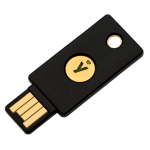
The Yubikey 5 NFC
The YubiKey 5 NFC is the leading hardware authentication solution for securing your digital access. Designed for ultimate versatility, it combines a USB-A connection with a contactless NFC interface (external link). This multi-protocol device eliminates the risk of phishing attacks by simultaneously protecting your personal accounts (email, social media) and your business infrastructure (cloud environments, servers, VPN access).
La YubiKey 5 NFC embarque six applications distinctes, totalement indépendantes les unes des autres et utilisables simultanément.
Note : certains logiciels comme GPG peuvent verrouiller l’interface USB CCID, empêchant temporairement d’autres applications d’accéder aux modes associés.
Technical Specifications for the Yubikey 5 NFC
Interfaces & Connectivity:
The YubiKey 5 NFC uses a USB-A interface (USB 2.0-compatible) as well as an NFC (Near Field Communication) interface for contactless use on mobile devices. All of the built-in applications are available through both of these communication channels.
OTP (One-Time Password) Module
Interface USB : OTP
Fonction : Contient 2 slots programmables indépendants. Chaque slot peut être configuré pour l’un de ces identifiants :
Yubico OTP
HMAC-SHA1 Challenge-Response
Static Password
OATH-HOTP (Counter-based)
OATH Module (Application-Based Two-Factor Authentication)
Interface USB : CCID
La YubiKey 5 NFC peut stocker jusqu’à 64 identifiants (firmware 5.7+) ou 32 (firmwares 5.0-5.6) (prenant en charge les protocoles OATH-TOTP basés sur le temps et OATH-HOTP basés sur un compteur). L’accès à ce module s’effectue via l’application dédiée Yubico Authenticator.
OpenPGP Module
This submodule implements the OpenPGP specifications for smart cards and integrates natively with GnuPG for your encryption, signing, and SSH key operations.
Protocol Updates: Version 2.0 of the OpenPGP specifications is enabled by default. Starting with firmware version 5.2.3 (and later), the key implements version 3.4 of these specifications.
Software requirement: To use key sizes greater than 2048 bits, you must have GnuPG version 2.0 (or later) installed on your system.
Supported basic algorithms: RSA 1024, RSA 2048, RSA 3072, RSA 4096.
Additional Algorithms (Firmware 5.2.3 and later):
Elliptic curves: secp256r1, secp256k1, secp384r1, secp521r1
Brainpool: brainpoolP256r1, brainpoolP384r1, brainpoolP512r1
Edwards/Montgomery: curve25519, x25519 (decryption only), ed25519 (signature and authentication only)
Physical specifications
Facteur de forme : Clé standard au format « Ticket », ultra-robuste.
Connecteur : USB-A (USB 2.0) et NFC. Toutes les applications sont disponibles sur les deux canaux.
Dimensions : 18 mm x 45 mm x 3,3 mm.
Poids : 3,7 g.
Résistance : Conception étanche et résistante à l’écrasement (coque thermoplastique hermétique, sans batterie ni pièces mobiles).
Plages de températures de sécurité :
Seuils en fonctionnement : 0 °C à 40 °C (32 °F à 104 °F)
Seuils en stockage : -20 °C à 85 °C (-4 °F à 185 °F)
FIDO2 / WebAuthn Protocol
Interface USB : FIDO
Fonction : Permet une authentification sécurisée unique (Single-Factor), multi-facteurs (2FA) ou totalement sans mot de passe (passwordless).
Capacité de stockage : Jusqu’à 100 clés résidentes (Passkeys / identifiants découvrables) pour les firmwares 5.7+ (25 pour les versions 5.0 – 5.6). Les identifiants non-découvrables sont illimités.
Sécurité renforcée : Ces identifiants sont protégés localement par un code PIN que vous définissez vous-même.
Mécanisme de validation : Une fois la clé déverrouillée par votre code PIN, une simple pression manuelle sur son capteur tactile valide votre présence et vous connecte instantanément. Certifié par la FIDO Alliance.
FIDO U2F Protocol
Interface USB : FIDO
L’application U2F (Universal 2nd Factor) est certifiée par la FIDO Alliance. Elle offre la capacité de générer et de détenir un nombre illimité d’identifiants pour sécuriser vos connexions en tant que second facteur (2FA).
PIV Module (Smart Card)
Ce module fournit une interface de carte à puce conforme aux normes PIV. Sous l’environnement Microsoft Windows, l’intégration du périphérique est optimisée par l’utilisation du minidriver officiel YubiKey Smart Card.
Interface USB : CCID
Fonction : Fournit une interface de carte à puce conforme aux normes PIV. Sous Windows, l’intégration est optimisée via le minidriver officiel YubiKey Smart Card.
Default values and secrets:
- PIN:
123456 - PUK code:
12345678 - Management Key:
010203040506070801020304050607080102030405060708
Algorithmes supportés : ECC P256, ECC P384, RSA 1024, RSA 2048.
Algorithmes additionnels (Firmware 5.7+) : RSA 3072, RSA 4096, Ed25519, X25519.
Algorithmes pour la Clé de gestion : TDES, AES 128/192/256 (firmware 5.4+).
Slot Architecture:
Slot 9a : Authentification (Authentication) — Note : En dehors de Windows ou sans minidriver, seul ce slot est lu pour l’authentification.
Slot 9b : Clé de gestion (Management Key)
Slot 9c : Signature numérique (Digital Signature)
Slot 9d : Gestion des clés (Key Management)
Slot 9e : Authentification de la carte (Card Authentication)
Slot f9 : Attestation
Slots 82-95 : Clés de gestion retirées (Retired Key Management, utiles pour conserver la capacité de déchiffrer d’anciens e-mails).
Documents related to the Yubikey 5 NFC
Video(s) related to the Yubikey 5 NFC
Découvrez la simplicité du paramétrage d’une YubiKey en tant que double facteur d’authentification de votre compte Google.
La YubiKey vous procure simplicité et protection dans la sécurité de votre compte de cryptomonnaies chez Binance. Cette vidéo vous explique pas à pas, la marche à suivre.
Introduction - Yubikey and Facebook (English)
Introduction - Yubikey and DropBox (English)
Introduction - Yubikey and Windows Hello (English)
Introduction - Yubikey and MacOs (English)
Introduction - Yubikey and Tweeter (English)
Introduction - Yubikey and GitHub (English)